How to Reschedule
Note: This feature is not available for all Photographers. Please contact Client Services or your Photographer directly for additional assistance.
Step 1: In Dashboard, navigate to “Scheduled Photo Shoots”
Step 2: Click “Need to reschedule?”
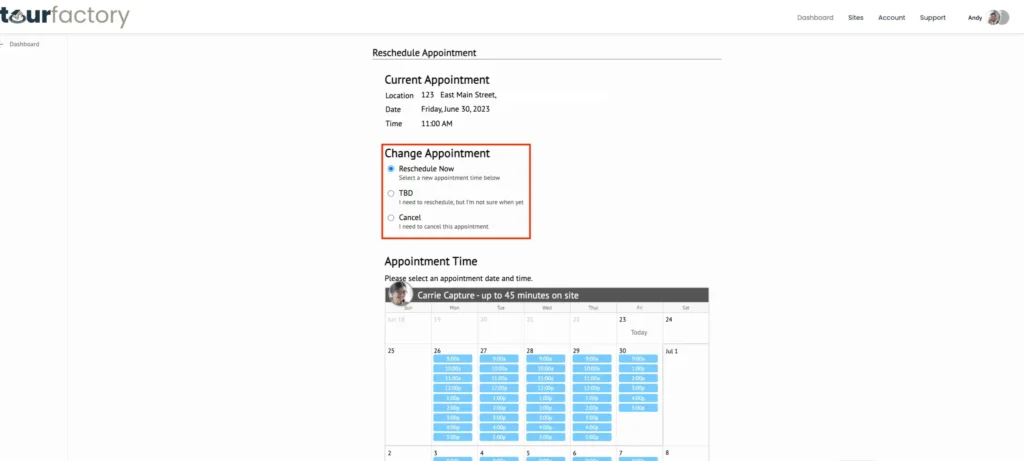
Step 3: Choose a ‘Change Appointment’ option
Step-by-Step:
Step 1: From your Dashboard, locate the photo shoot you would like to reschedule under ‘Scheduled Photo Shoots’
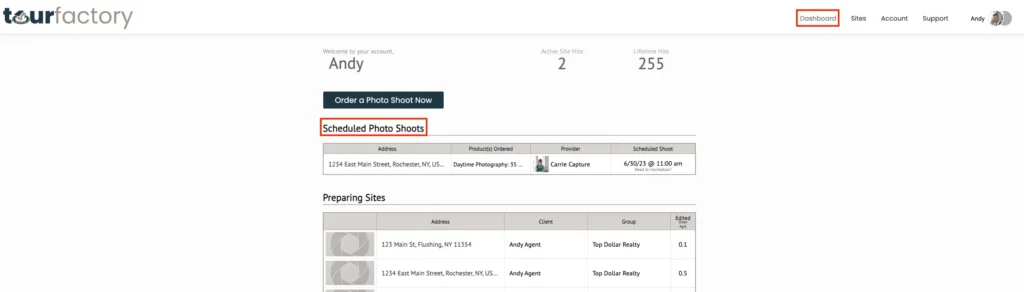
Step 2: Click ‘Need to reschedule?’ underneath the scheduled shoot day/time.

Step 3: Choose a ‘Change Appointment’ option:
Reschedule Now – select from the appointments listed below
TBD – select if you don’t know the new date/time yet.
Note: if possible, please provide a tentative date in the Additional Information field and follow up with Client Services and/or your Photographer for assistance completing the reschedule request.
Cancel – select for a partial order cancellation.
Note: This is cancelling the date/time only. If you need to cancel the entire order and receive a refund/credit please contact Client Services or your photographer.